Imaging, from the modality to the signed report
Studies arrive from your machines, land on the right order, and move through a radiologist workflow that ends in a report you can print and hand over.
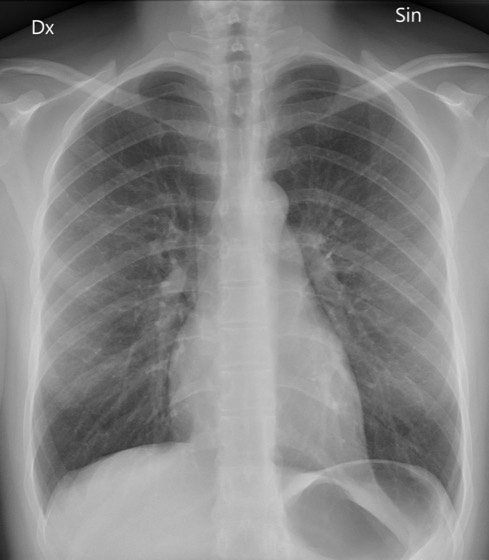
Your machines send straight to the record
DICOM studies are received from the modality and attached to the patient's order. Each file is checksum-verified on arrival, and a study that does not match its accession number is rejected rather than filed against the wrong patient.
Direct modality reception
Studies flow straight from your imaging equipment into the patient's clinical order without manual file export, USB drives, or physical disks.
Checksum & accession safeguard
Every file is verified by checksum upon receipt. If an accession number does not match an active order, the study is rejected rather than filed to an incorrect record.
ImageLink, the small connector that sits beside your scanner
The film stops travelling on a disc. ImageLink is a small connector that runs on a machine in your hospital: your scanner sends the study to it over DICOM, and it puts that study on the patient's order in the system. We install and pair it with you — it is not something a hospital switches on by itself.
We set it up with you
ImageLink is switched on by our team, not from a settings screen, and each connector is paired to your hospital before it will send anything. A hospital can run several — one beside each machine.
Every connector on one screen
Name and AE title, whether it is paired, when it last reported, when it last received a study, how many studies are queued behind it and how much disk it has left. Any connector can be revoked from the same screen.
A quiet connector is noticed
If a connector has not reported for fifteen minutes the console marks it Not reporting, and shows the number of studies waiting behind it — so a machine that has gone quiet is visible before anyone goes looking for a study.
Modality worklist
The machine pulls the day's list from the system so the technician does not retype patient details at the console. Scheduled and walk-in work both appear.
No manual console re-typing: patient demographics, MRN, and accession numbers sync automatically to the machine.
Scheduled and walk-in orders: appointments and immediate OPD walk-ins populate the worklist together so the technician can proceed without delay.
X-rays open in the browser
X-ray images open in the browser with zoom, pan, rotate, brightness, contrast and invert. Nothing to install on the machine staff happen to be using.
CT and MRI studies are received and stored
Studies from CT and MRI modalities are received and kept against the patient's order with the rest of their record.
Order-attached studies
Studies arriving from CT and MRI scanners are received and stored directly under the corresponding clinical order, keeping the patient's complete investigation history together.
Single patient record
Modality files remain organized alongside consultation case sheets, lab investigations, and IPD admissions under the patient's unified ID.
A radiologist workflow, not a folder
An ordered workflow from request to delivery, with reporting and verification as separate steps, so the person who verifies is not the person who reported.
Request & Acquisition
The doctor places the imaging order, the modality worklist queues it, and the completed study arrives attached to the record.
Reporting
The reporting radiologist drafts findings and clinical impressions in structured report fields.
Separate Verification
A separate verifying practitioner reviews and signs off on the report before it can be finalized and delivered.
Reports that print properly
Findings and impression as rich text on the hospital's own letterhead.
Rich text formatting
Clean, structured formatting for clinical findings, technique, comparison notes, and impressions without broken lines or misaligned tables.
Hospital letterhead output
Reports generate on your hospital's own branded letterhead with verified doctor credentials, ready to print and hand over to patients.
Radiology and imaging management from modality to signed report
Connect imaging modalities directly to patient records, manage technician worklists, view X-rays in the browser, and move studies through a structured radiologist reporting workflow.
Modality connectivity and patient order matching
DICOM studies are received directly from the modality and attached to the patient's order. Every incoming file is checksum-verified on arrival, and any study that does not match its accession number is rejected rather than filed against the wrong patient.
With modality worklist support, the imaging machine pulls the day's scheduled and walk-in order list directly from the system, eliminating the need for technicians to retype patient details at the console.
- Direct DICOM reception from modalities to patient orders
- Arrival checksum verification and accession number validation
- Modality worklist for scheduled and walk-in imaging orders
- Browser-based X-ray viewing with zoom, pan, rotate, brightness, contrast, and invert
- CT and MRI studies received and stored against the patient order
- Two-step radiologist workflow separating reporting from verification
Radiologist reporting and letterhead delivery
An ordered workflow guides studies from initial request to report delivery, with reporting and verification maintained as separate steps so the verifier is distinct from the reporting radiologist.
Final reports include findings and impressions formatted as rich text and printed on the hospital's own letterhead.
Frequently asked questions
How are imaging studies matched to patients?
DICOM studies sent from modalities are matched by accession number to the patient's order. Files are checksum-verified on arrival, and studies with non-matching accession numbers are rejected.
What tools are available for viewing X-rays?
X-rays open directly in the browser with tools for zoom, pan, rotate, brightness, contrast, and invert. Staff do not need to install local software to inspect images.
How are CT and MRI studies handled?
Studies from CT and MRI modalities are received and stored against the patient's order alongside the rest of their medical record.
How does the radiology workflow separate reporting and verification?
The system enforces an ordered workflow where reporting and verification are separate stages, ensuring the person verifying the report is not the person who drafted it.